HomeMapper
Your entire smart home network. One view.
Scan HomeKit, Home Assistant, Thread, Matter, IP, and more. Every device, every detail.

iPhone · iPad · Mac
The more devices you add, the less you see.
You added the plug. It worked. Six months later, something on the network stops responding, and you have no idea which device, or why. Apple's Home app shows you rooms and toggles. It doesn't tell you which protocol each device uses, what firmware it's running, whether it's actually reachable, or what role each device plays on your network.
Apple Home controls. HomeMapper inventories.
Apple Home is for turning lights on, locking doors, running scenes. HomeMapper is for knowing what's on your network: which devices speak Matter, the Thread mesh role where reported, each IP accessory's address and how quickly it answers, the firmware it's running, whether it's reachable. It's also where you keep the setup codes Apple Home uses to pair a device, then never shows you again. HomeMapper doesn't replace Apple Home; it shows you what Apple Home leaves out.
Every way your devices show up, in one view.
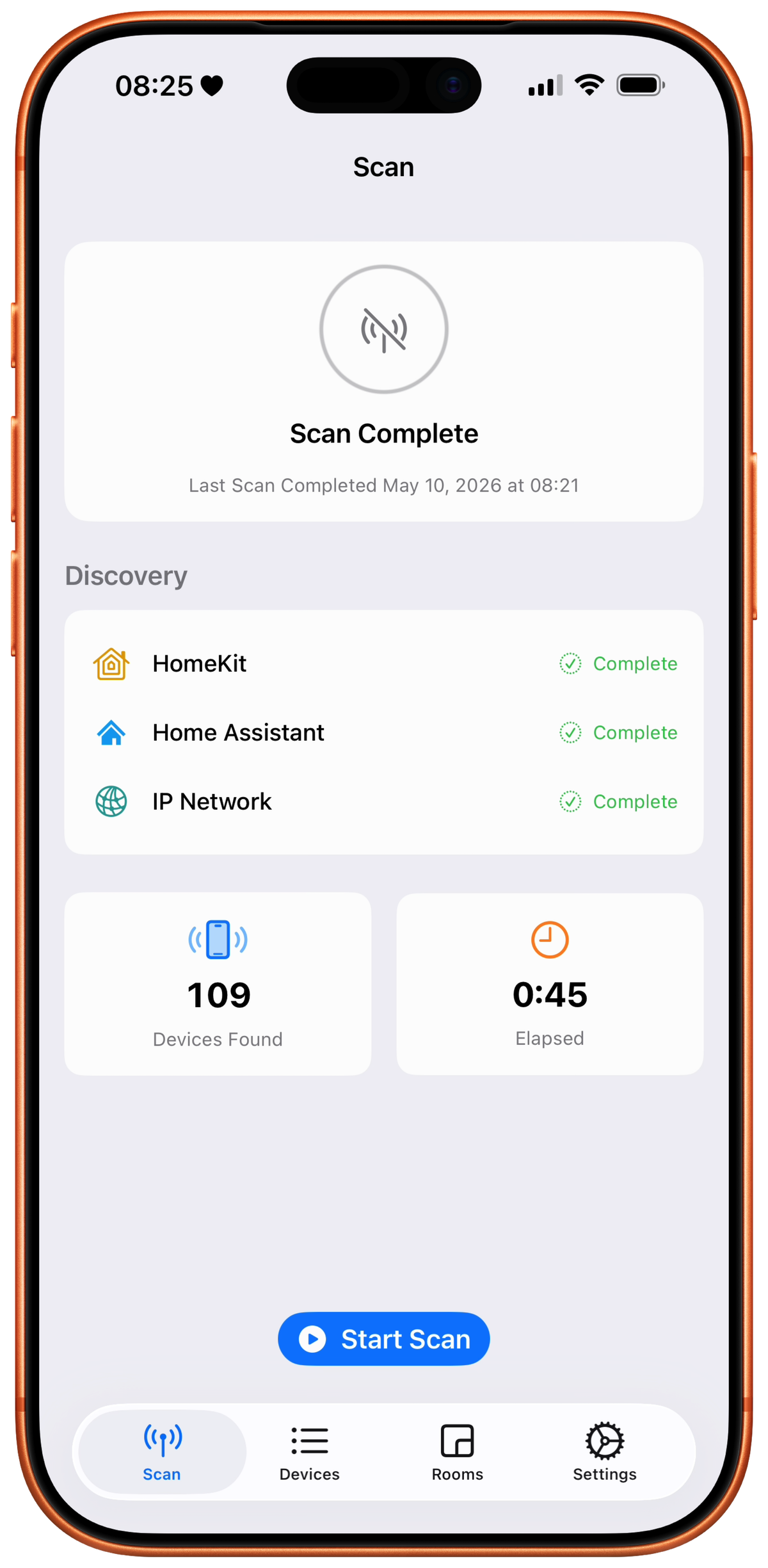
HomeMapper runs every discovery method a device might announce itself on, concurrently:
- Apple's ecosystem. HomeKit via Apple's framework. Thread accessories through HomeKit, plus Border Routers that announce themselves on the network. Matter detected during the HomeKit scan.
- The network itself. Anything that announces itself on your Wi-Fi: printers, TVs, cameras, NAS boxes, and older gear that only speaks SSDP/UPnP.
- Home Assistant. Direct read of your Home Assistant device registry, including Matter, Thread, Zigbee, Z-Wave, ESPHome, and MQTT devices.
When the same device shows up through more than one method, HomeMapper merges the records by MAC address or serial number, never by name. If two records can't be matched with confidence, it shows them separately rather than risk collapsing two different devices into one.
HomeMapper only looks. It never turns anything on, changes a setting, or pairs a device.
HomeKit scanning is free. Home Assistant, network scanning, and the Topology map are Pro.
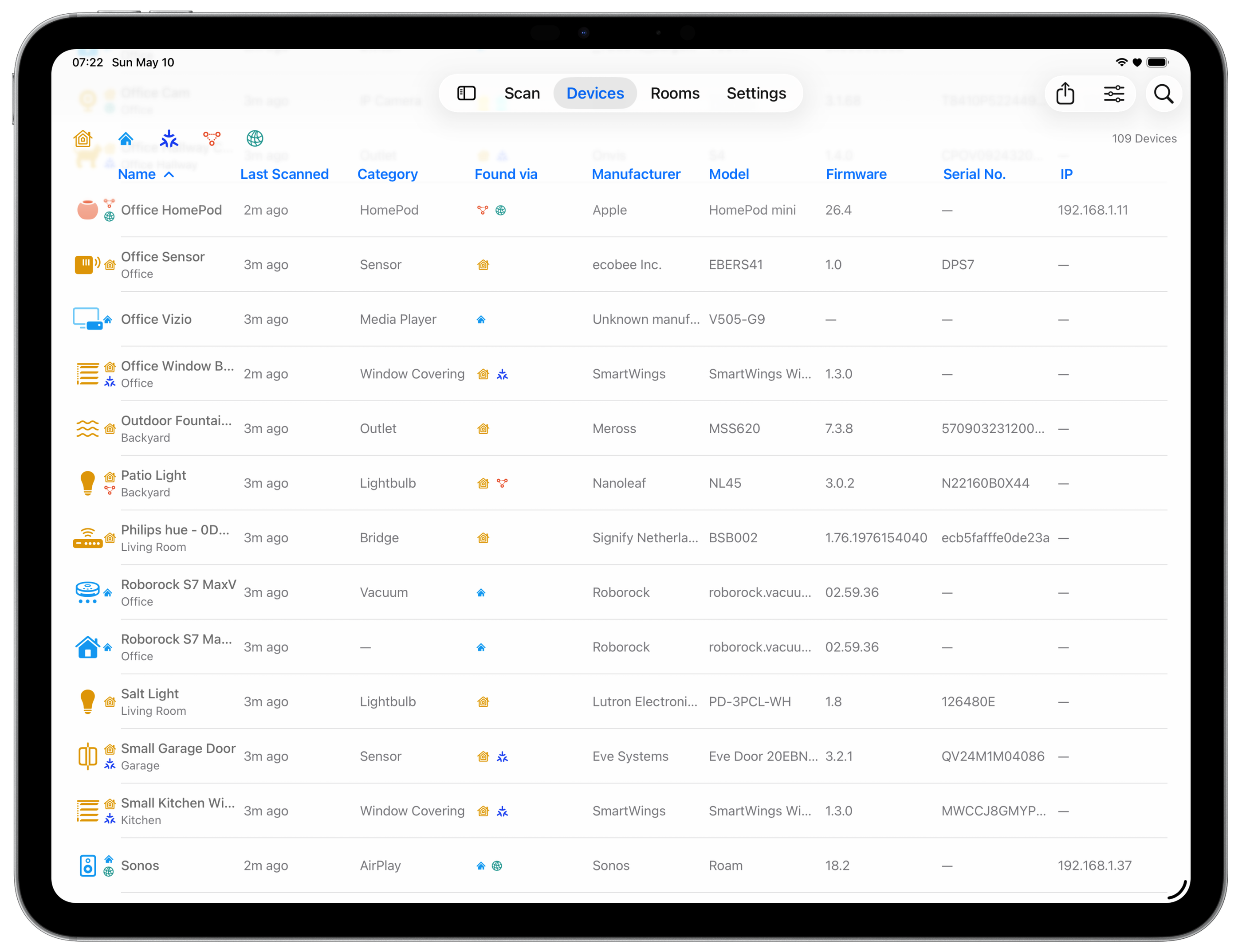
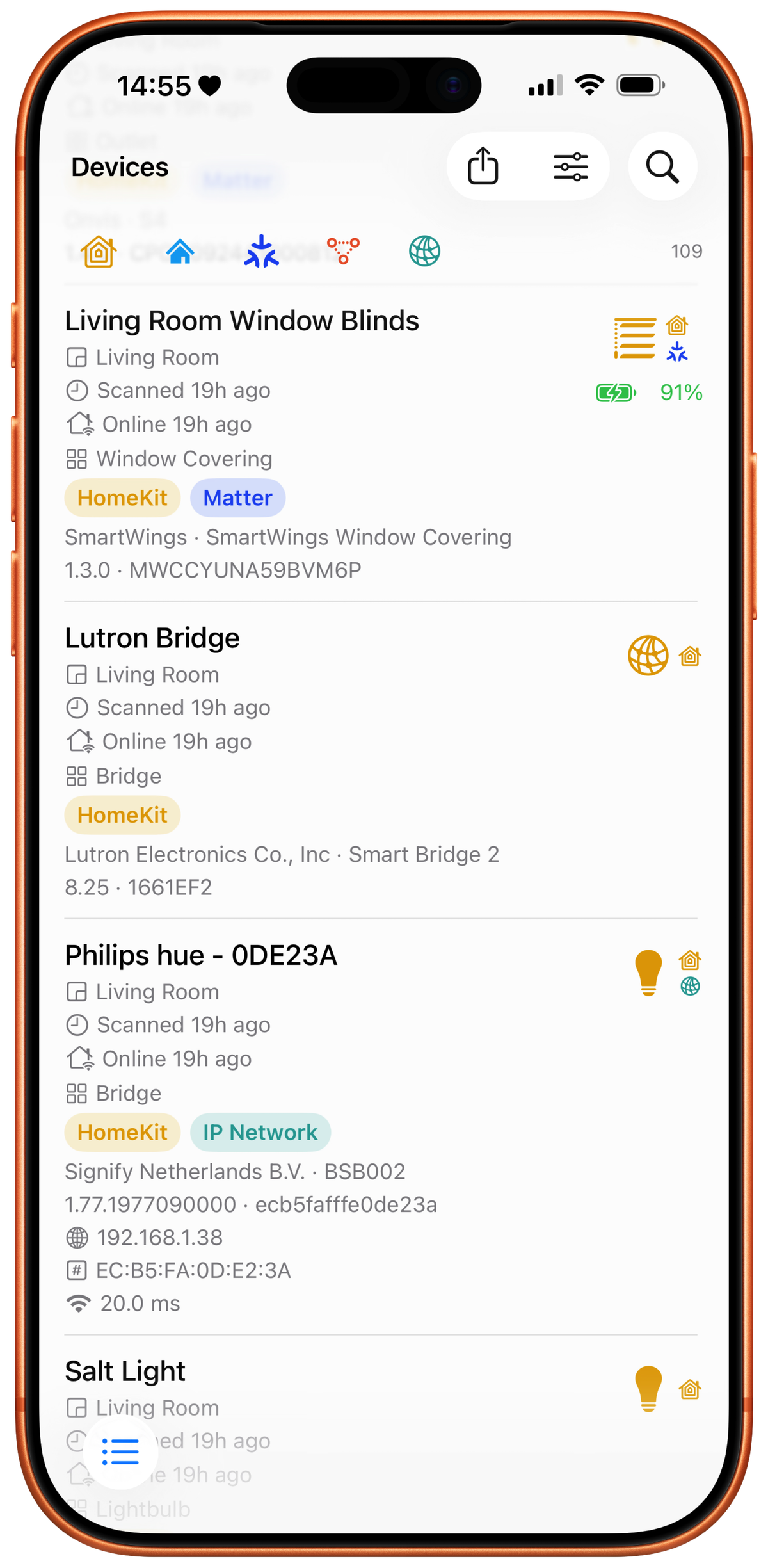
Your devices, every detail.
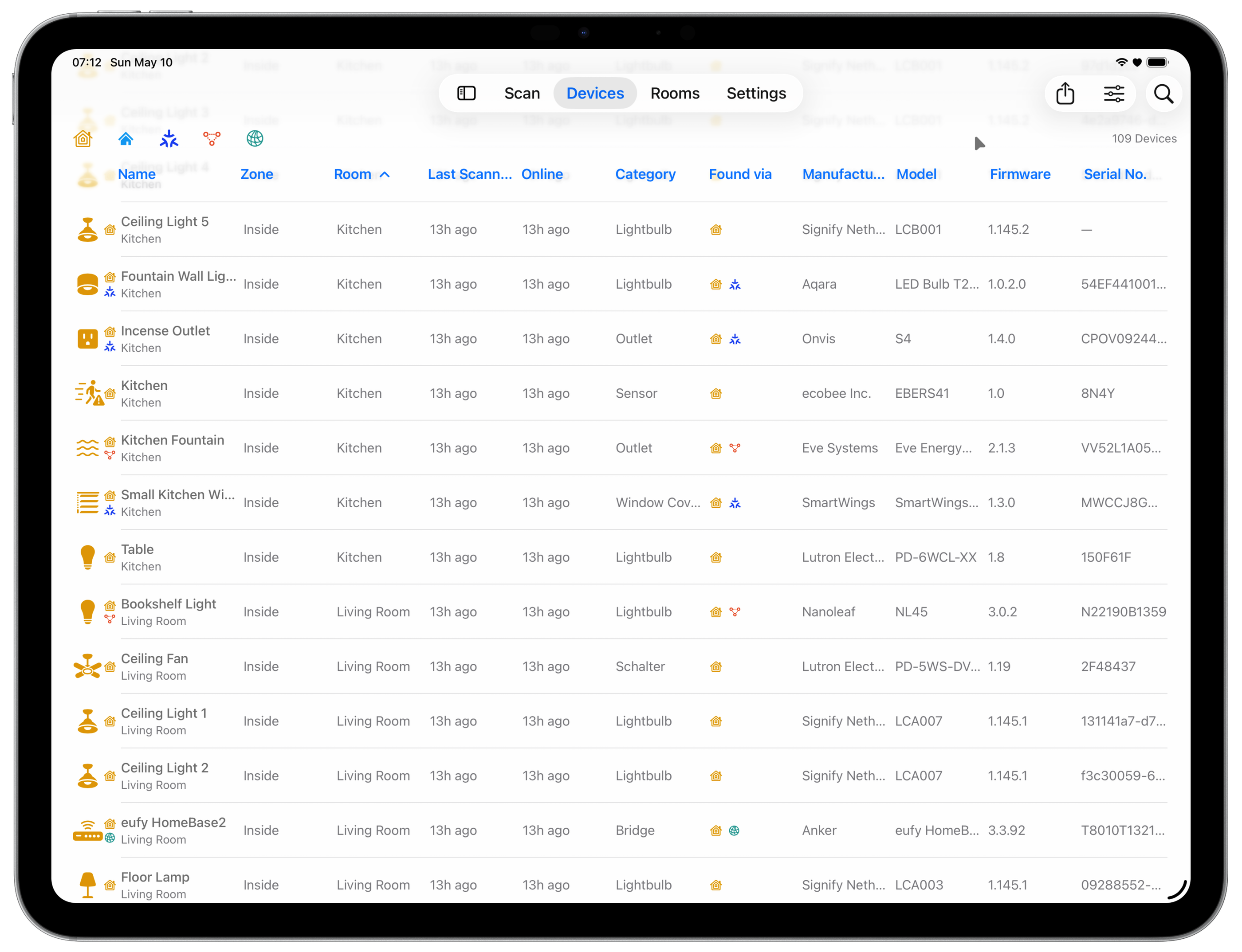
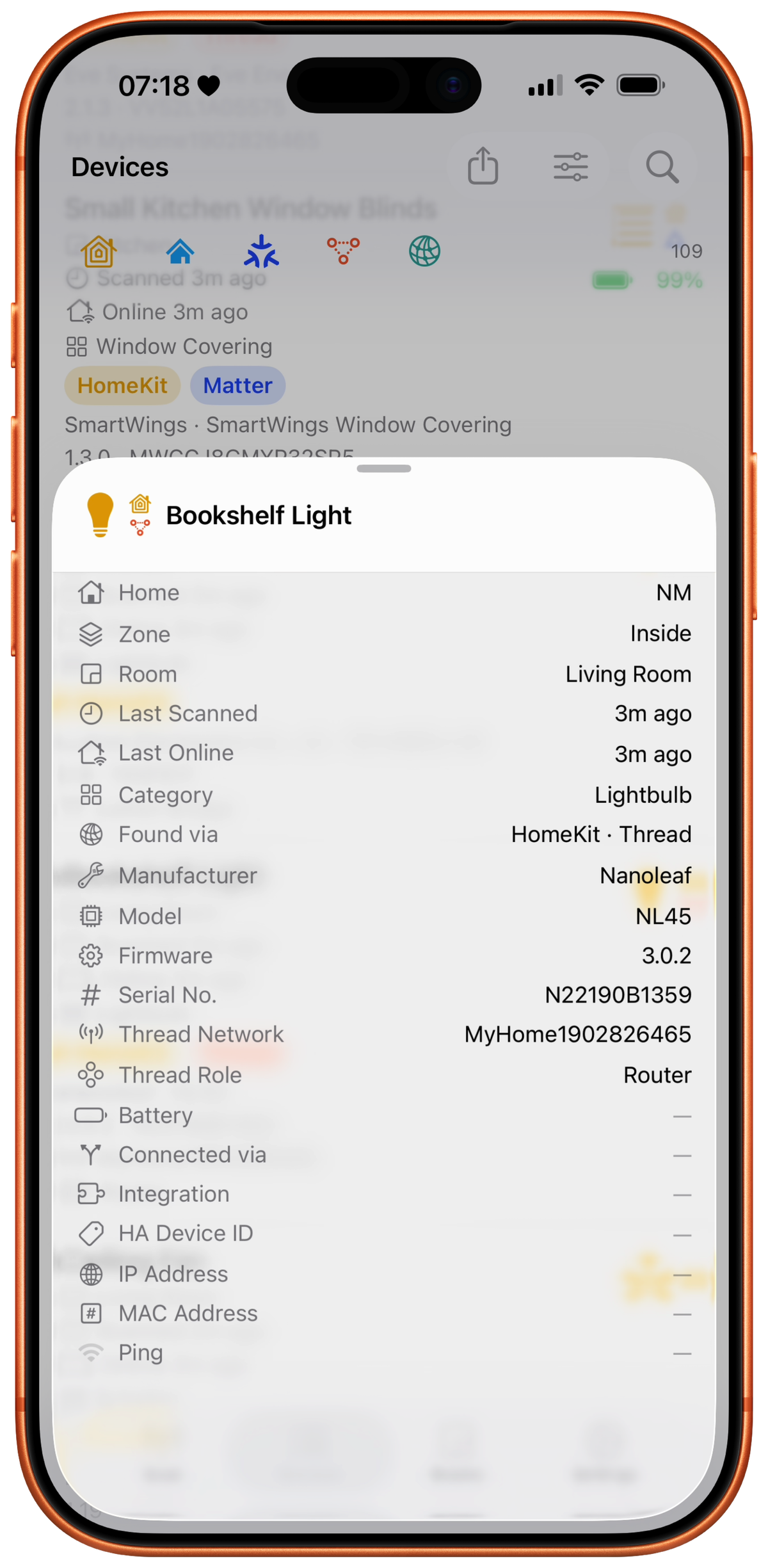
See devices Apple's Home app can't (printers, TVs, cameras, Home Assistant, anything else on your Wi-Fi) and the details it tucks away (manufacturer, model, firmware, serial number, battery, Matter and Thread info). Sort, search, and customize the columns to match how you work.
On iPad and Mac, devices appear as a table that fits as many columns as your screen has room for. On iPhone, they appear as rich detail cards.
Room-based view groups devices by room, with reachability status and protocol badges.
Sort and filter by any column; search by name, room, manufacturer, or model.


See how it all connects.
The Topology map draws your smart home the way it's actually wired: your Thread mesh, from the border routers down to the end devices they carry, and each HomeKit bridge with the accessories behind it. It only draws connections it has measured.
Filter down to just your Thread mesh or just your bridges, or switch to Health for a list of what needs attention. Tap any device for the same detail you get everywhere else. Tap a connection to see how strong that link is and how often the device has had to reconnect. A device that keeps losing its place in the mesh shows up here even when its signal reads fine.
When a device won't say how it's connected, HomeMapper groups it aside instead of guessing, and tells you which of those cases means something is actually broken. Your border routers, like HomePods and Apple TVs, always appear, because they announce themselves on your network.
Pinch to zoom on device. Export the whole map as a PNG, a PDF, or an SVG that stays sharp at any size. The file covers the full map, not just what's on screen, titled with the home and stamped with the date. Topology is a Pro feature, included in the 7-day trial.


Know what to fix first.
Health lists what's wrong on your Thread mesh, worst first. Every row names the devices involved and tells you what to do about it.
It flags devices that stopped answering, connections that are too weak or dropping traffic, routers that everything behind them depends on, and devices that keep restarting.
Each Thread network in your home gets a summary line: its name, its radio channel, and how many routers it has.
Problem connections are flagged in red on the map itself, so you can spot them without switching views. When nothing is wrong, Health says so.
Health is part of the Topology map, so it's a Pro feature, included in the 7-day trial.
Not sure why an accessory keeps going unresponsive? Read why Thread devices keep dropping off.
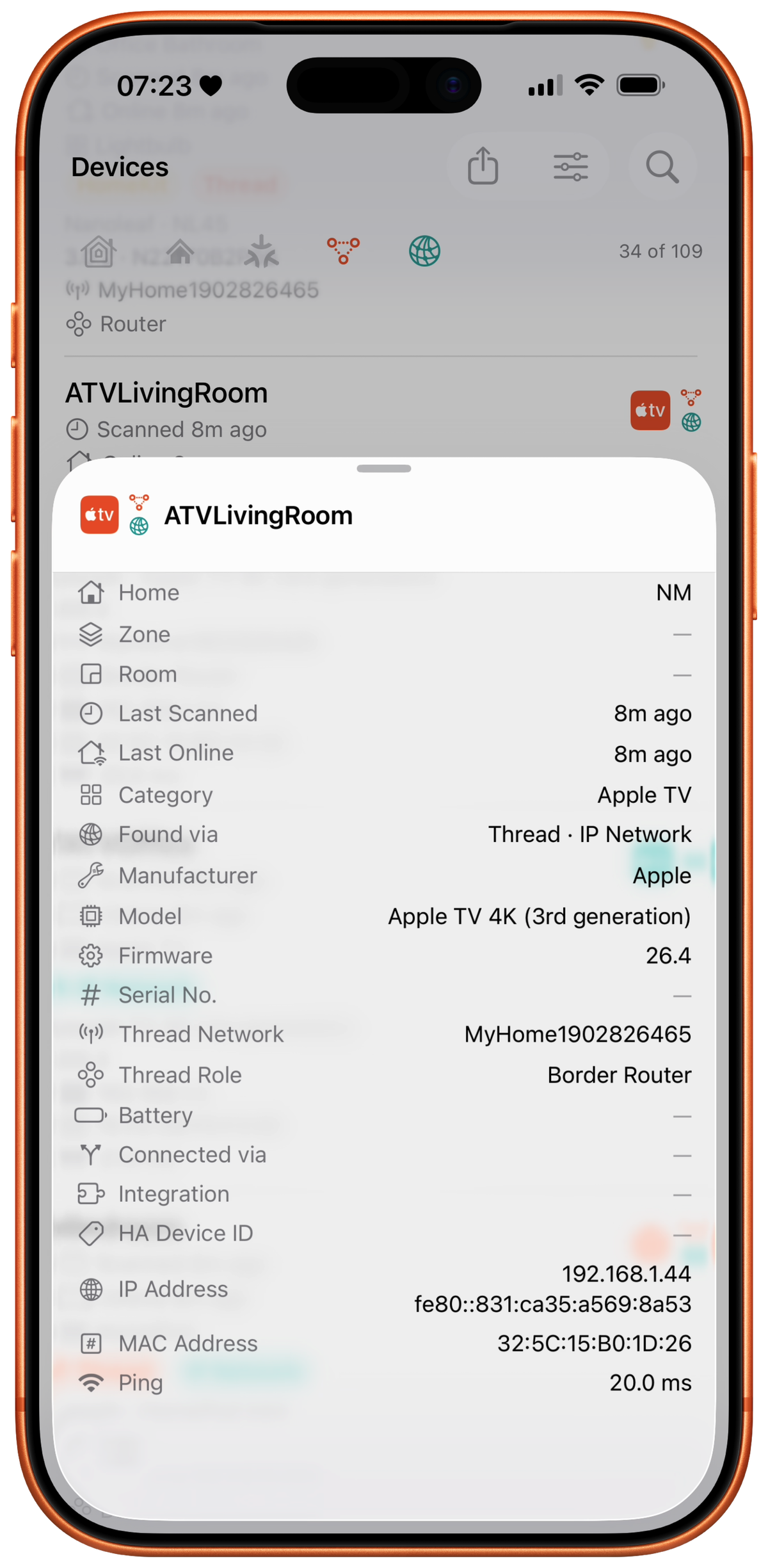
All the details a device will share.
HomeMapper fills in as much about each device as it can get.
Thread role, network name, IP address, MAC address, signal strength, firmware version, serial number, battery level, and a dozen more fields, pulled from every source that reports them and merged into one device record.
What you get varies by device. HomeMapper shows whatever each one reports.
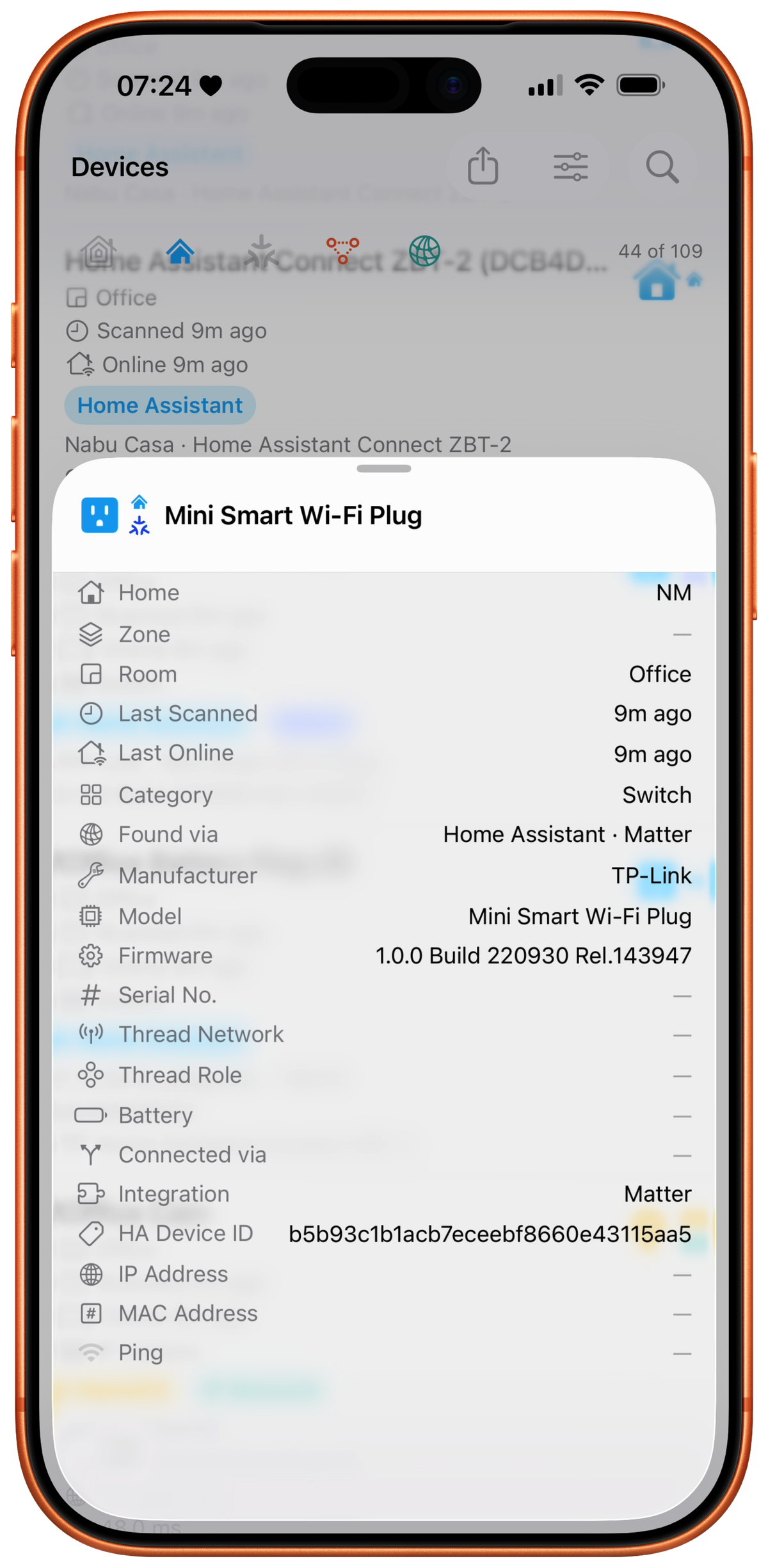
Home Assistant
HomeMapper scans your Home Assistant instance with the same depth it scans HomeKit. Devices from both platforms flow into one inventory, correlated by hardware identifiers.
Zigbee, Z-Wave, ESPHome, MQTT: devices HomeKit can't see become visible alongside the ones it can. One scan covers both platforms.
Choose your Primary Platform (HomeKit or Home Assistant) and HomeMapper favors its rooms, names, and ordering when a device is known to both.
Home Assistant integration is a Pro feature. Included in the 7-day Pro trial, cancel anytime.


Save your setup codes while you still have them.
Every HomeKit, Matter, and Z-Wave device has a setup code: a number or QR on the device or its box. You need it to pair the device, and again if you ever reset it or move it to a new home. Labels fade and wear off, especially outdoors, and no scan can recover a lost code, because setup codes never travel over the network.
HomeMapper keeps each code with its device. All your codes, HomeKit and Home Assistant, in one place. Type it in, scan the QR sticker, or pick a photo that has the QR in it. For older HomeKit accessories that print an 8-digit number instead of a QR, HomeMapper reads the printed digits too, by camera or from a photo. A room-by-room list shows every device that can hold a code but doesn't have one yet, so you can work through the house once.
Lots of devices? Export a CSV worksheet, fill in the blanks in a spreadsheet, and import it back. The same file imports on your other devices too.
Your codes are yours: saved on your device, included in your backups, exportable as CSV. With iCloud Sync on, they also sync across your devices through your own iCloud, never a server of ours. Setup code saving is a Pro feature, included in the 7-day trial.
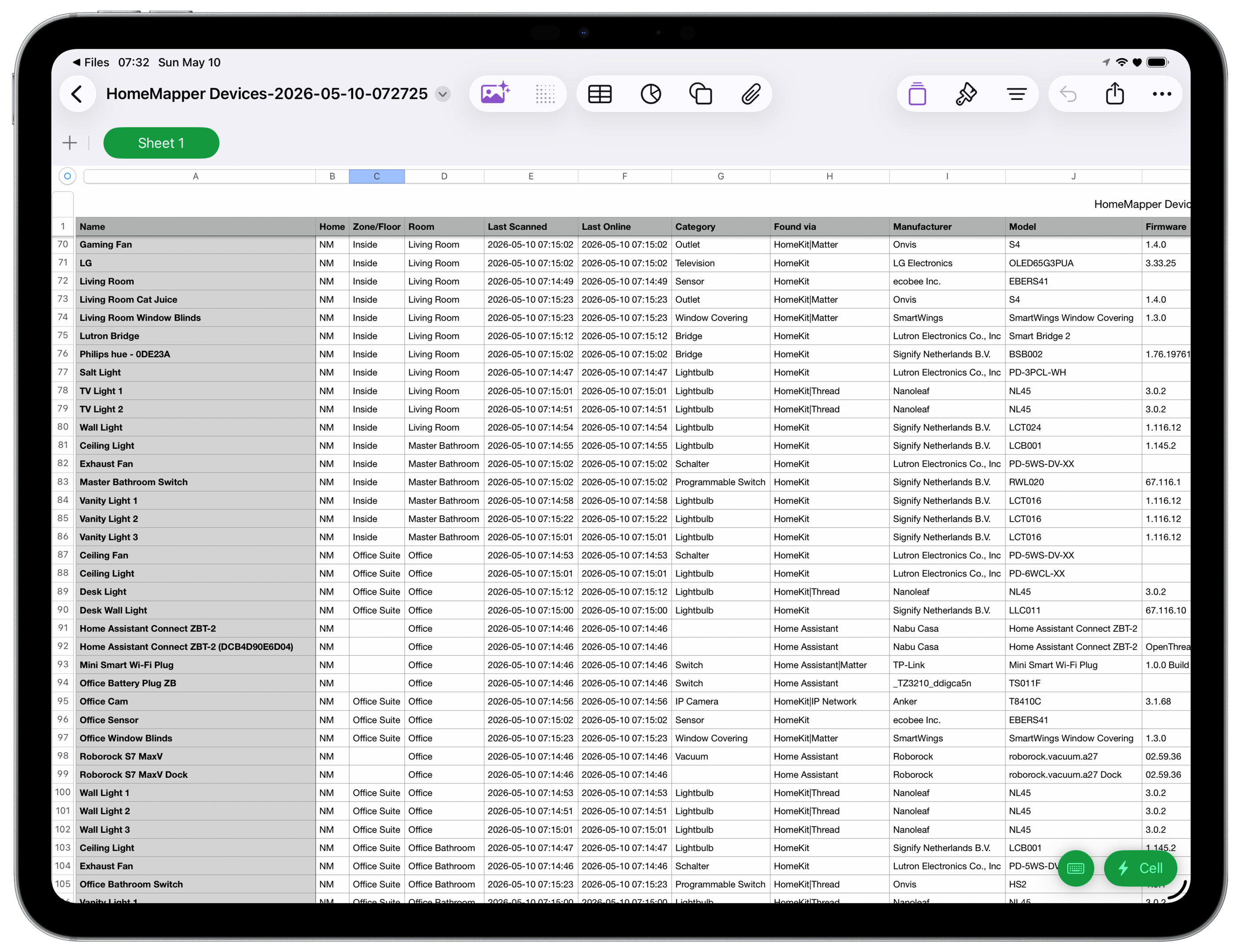
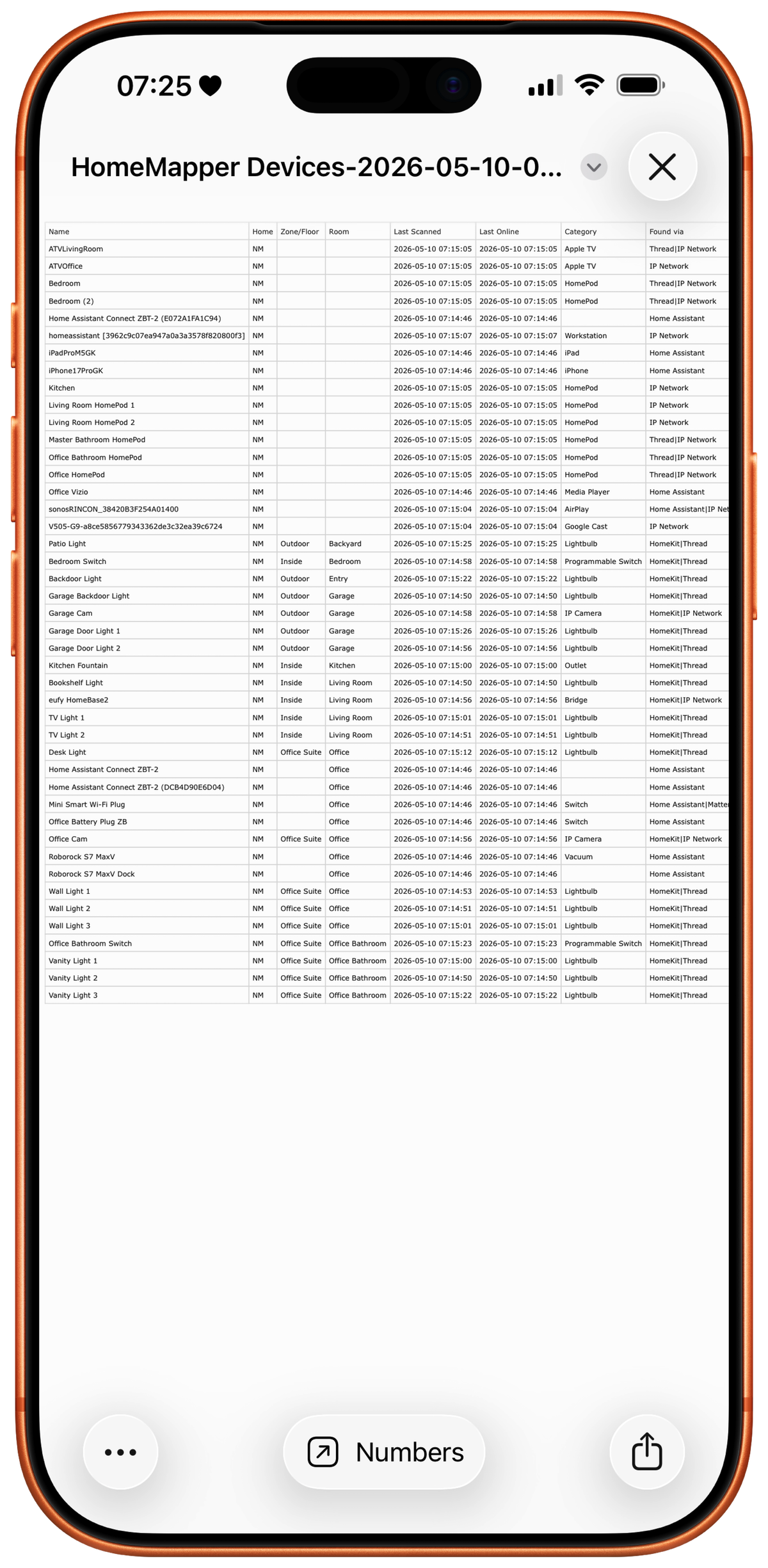
Export everything.
Export your entire device inventory to CSV. All columns, all devices, filtered exactly how you want.
Use it for insurance documentation, network planning, troubleshooting, or just having a record of what you've built.
Your data lands in a tool you already use: Numbers, Excel, or Google Sheets.
Nothing leaves your device unless you send it.
Your data. Your control.
- No ads, no tracking, no data collection.
- Your scan results stay on your device. What syncs across devices, like room order and saved setup codes, uses your own iCloud, never a server of ours.
- No account required. The only login is directly to Home Assistant, and only if you choose to connect it.
- Nothing about how you use the app is measured or sent anywhere.
Free forever. Pro when you're ready.
Free
$0
Forever
- HomeKit scanning
- Device list with core columns
- Room-based view
- Switch between Apple Homes (one at a time)
- No scan limits
- No time limits
Pro
$19.99/year
7-day free trial
- Everything in Free
- All 24+ data columns
- Multi-protocol scanning
- Protocol filtering
- Combined “All Homes” view
- Home Assistant integration
- Topology map and Thread health
- CSV export
- Backup and restore
- Setup code saving
All Pro features are included in the 7-day free trial. Cancel anytime.
Download free. Try Pro for 7 days.
iPhone · iPad · Mac
Questions, answered.
What's included in the 7-day Pro trial?
Everything in Pro: all data columns, multi-protocol scanning, protocol filtering, combined “All Homes” view, Home Assistant integration, the Topology map and Thread health, CSV export, backup and restore, and setup code saving. The trial starts when you opt in. You can cancel any time during the 7 days through your App Store subscriptions.
The trial applies to the annual subscription. Lifetime Access has no trial, so the 7 days are the way to try Pro before you decide which one to buy.
Why is Pro a subscription?
No ads, no trackers, and we don't sell your data. Your scan results stay on your device, and they stay yours. Paying for Pro is how we keep it that way.
Pro funds the work: keeping up with each iOS, macOS, HomeKit, Matter, Thread, and Home Assistant release, fixing bugs, and building new features.
The subscription isn't the only way to pay. Lifetime Access is a one-time purchase that gives you Pro permanently, if you'd rather not have anything renew.
The Free tier covers HomeKit scanning, the device list, and the room-based view. Pro is for people who want the full picture across protocols and who want to back what we're building.
Is there a one-time purchase option?
Yes. Lifetime Access is a one-time $79.99 purchase that gives you HomeMapper Pro forever: no renewals, no expiration. It works on every device signed into the same Apple ID.
The annual subscription with a 7-day free trial is still available if you'd rather try it first or pay yearly.
How do I cancel Pro?
Through the App Store, like any Apple subscription: Settings › [your name] › Subscriptions › HomeMapper. Cancel any time; you keep Pro features until the end of the current billing period.
Lifetime Access has nothing to cancel. It's a one-time purchase with no renewal and no billing period, so it stays with you.
Does any of my data leave my network?
Your scan results are never sent automatically. They live in a local database on your device. HomeMapper has no analytics SDK, no tracking, and no cloud relay. When you connect Home Assistant, HomeMapper talks directly to your instance on your local network. Some of your setup (room order, Home Assistant connections, and saved setup codes) syncs across your devices through your own iCloud, never a HomeMapper server.
Your scan data leaves your device only when you send it, and only in two ways:
- CSV export. You choose when, what to include, and where it goes.
- Send Logs from Settings. Optional, for support. Logs include device, room, and home names, plus scan details. They never include passwords, HomeKit credentials, or network keys.
Do I need Home Assistant to use HomeMapper?
No. HomeMapper works on its own. HomeKit scanning, the device list, and room-based view are all available on the Free tier without Home Assistant. If you do run Home Assistant, Pro unlocks a unified inventory across both platforms.
Why can't some Thread devices be placed on the Topology map?
The map only draws a connection it has actually measured. When there's nothing to draw, HomeMapper puts the device in a dashed box inside its Thread network rather than guessing. It's on the mesh; we just can't see what it's attached to.
Three things cause this, and the map splits them into three named groups. Devices set up with an Apple Home code instead of a Matter code report their Thread role, but Apple doesn't expose what they're connected to (an Apple limitation, and we've filed feedback); those show up under Not Shared by Apple Home. Some Matter over Thread devices answer HomeMapper and then publish no neighbor list of their own (that part of the spec is optional, and some devices skip it); those show up under Device Doesn't Report Connections. The first two mean there was nothing to draw, and there's nothing for you to do about either.
The third group is the one worth acting on. Out of Range or Offline means HomeMapper asked the device directly and it never answered: it's unplugged, out of range, or stuck. Go check it. This box doesn't appear at all when the last scan ran with HomeMapper in the background, because iOS won't let the app reach any device then.
Border routers like HomePods and Apple TVs always appear, because they announce themselves on your network rather than needing another device to report them.
If a device showed up before and doesn't now, run another scan with Thread Topology Scan turned on (Settings › Discovery in the app). It can pick up connections that were missed.
Can HomeMapper control my devices?
No. HomeMapper discovers and inventories. It never turns things on, changes settings, or commissions devices. Scanning is all it does.
Does HomeMapper run on Android or Windows?
HomeMapper is an Apple-platform app: iPhone, iPad, and Mac. HomeKit's framework is Apple-only, and that's where HomeMapper starts. We have no Android or Windows version planned.
Built by people who run these networks at home.